

Add An Investment Account And Holdings
Add your TFSA, RRSP, FHSA or other accounts to Maple Finance, then add holdings or log buys and sells. Maple works out your gains with live prices.
Paste it into ChatGPT or Claude to ask questions about it.
Updated View As Markdown
Maple Finance puts your investments next to your budget. Add each account once, then tell Maple what’s in it. Maple fetches live prices and works out your total return, gains and allocation.
Before You Start
- Maple Finance is part of Maple Pro. Without a plan, it opens on the Maple Pro screen with a 7-day free trial.
- Have your account statements handy for what you own and what you paid.
- Connected an investment account through your bank? It can sync into Maple Finance on its own.
On iPhone
1. Open Maple Finance
On Home, tap Finance at the top, next to Budget. Maple Finance has its own tabs: Dashboard, Portfolio, Net Worth, Transactions, Watchlist, Accounts and Settings.
2. Add An Account
Open Accounts and tap Add Account. Fill in:
- Name, like “TFSA”.
- Institution, like “Wealthsimple”.
- Type: TFSA, RRSP, FHSA, Non-Registered, Savings / Cash or Crypto.
- Currency: CAD, USD or GBP.
- Group, if you want to group accounts together.
- Cash in each currency, and Total Contributed so Maple can work out your return.
Tap Save.
3. Add A Holding
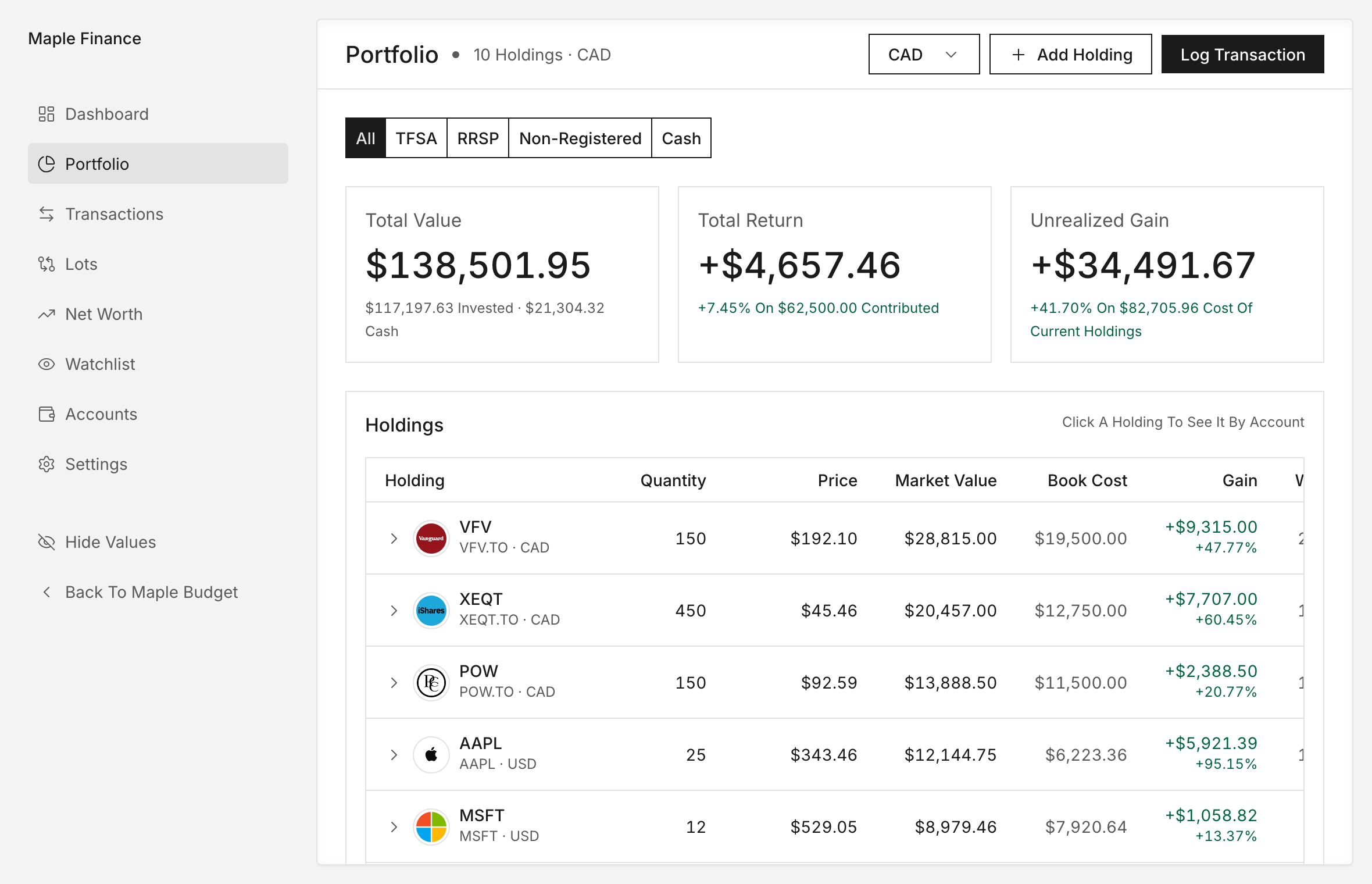
Open Portfolio and tap + Add Holding. In Add Position, keep Stock Or ETF picked and fill in the Account, the Yahoo Ticker (like XEQT.TO), a Display Ticker, the Currency, the Quantity and Book Cost (Total), which is what you paid in total. Save it.
4. Or Log Your Buys And Sells
To track each trade instead, tap Log Transaction on Portfolio or the Transactions tab. In Add Transaction:
- Pick BUY or SELL.
- Pick the Account and the position, or + New Ticker.
- Type the Quantity, plus Book Cost (Total) for a buy or Sale Amount for a sell.
- Set the Date.
- Tap Record Purchase or Record Sale.
5. Check Your Portfolio
Your holdings show on Portfolio, and the Dashboard shows your total with live prices. A holding without a live price shows No Price and counts at its book cost. Tap it to set a Manual Price Per Share.
6. Options And Employee Stock
Have stock options, RSUs or ESPP from work? In Add Position, pick Option, then From My Employer under Where Did You Get It? Grants show in an Equity Compensation card.
On Android
The steps are the same as on iPhone.
On The Web
- Click the Maple Finance card at the top of the sidebar, then Accounts.
- Click Add Account. The fields match the app, and the web also offers EUR.
- Open Portfolio and click Add Holding, Add Option or Log Transaction.
- In Log Transaction, type a Ticker and click Look Up. Maple shows the price it found, or tells you it couldn’t find one. You can still save it with a manual price.
- Pick Buy or Sell, then fill in Total Paid or Total Received.
The web also has Lots, which follows every buy for 500 days so you can see if you sold too early.
Tips
- Take a net worth snapshot after you add everything. It’s your starting point.
- Share an account with a partner? Set Your Share so your totals count only your part.
Common Questions
Is Maple Finance Free?
Maple Finance is part of Maple Pro, which is $1.99 a week with a 7-day free trial. Maple Pro Plus is $2.99 a week. Budgeting stays free.
Should I Add Holdings Or Log Transactions?
Add a holding when you just want what you own today. Log transactions when you want Maple to follow each buy and sell, so it can work out your gains over time.
What Ticker Do I Type?
Use the Yahoo Finance ticker. Canadian listings end in .TO, like XEQT.TO. On the web, Look Up checks the ticker and shows its price.
What If A Holding Has No Live Price?
It shows No Price and counts at what you paid. You can enter a manual price per share for things like private shares.
Try It In Maple Budget
Budgeting is free on iPhone, Android and the web. One account works everywhere.