

Set A Monthly Budget For Each Category
Give each Maple Budget category its own monthly budget, then see what's left at a glance. Bars turn orange past 80% and red once you go over.
Paste it into ChatGPT or Claude to ask questions about it.
Updated View As Markdown
Maple Budget sets budgets one category at a time. Give Groceries $400 and Eating Out $200, and Maple shows how much of each is left as you spend.
Before You Start
- You need a Maple Budget account on iPhone, Android or the web.
- Budgets are monthly. Set the amount you want to spend in a normal month.
On iPhone
1. Open The Categories Tab
Tap Categories in the tab bar. You’ll see every category with what you’ve spent this month. You can also tap a category card in the Categories row on Home.
2. Tap A Category
Tap the category you want to budget. Its sheet opens with this month’s spending. If it has no budget yet, you’ll see how much you spent and an Add Budget link.
3. Tap Add Budget
Tap Add Budget. The Edit Monthly Budget box opens. Type the amount and tap Add.
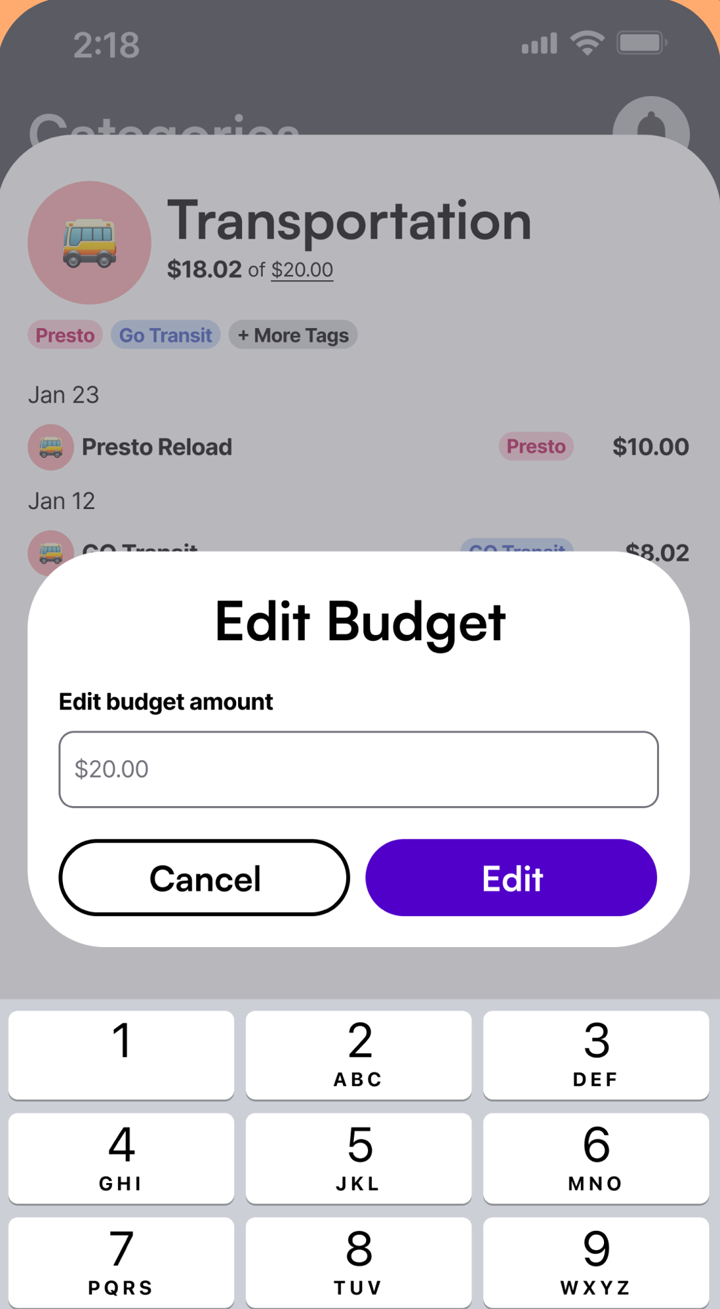
You’ll see “Budget amount updated successfully.” The category now shows what you’ve spent out of its budget, like $48.00 of $150.00.
4. Change A Budget Later
Open the category again and tap the budget amount. It’s underlined, so you know you can tap it. Type the new amount and tap Save.
5. Watch The Bars
Back on the Categories tab, each bar fills as you spend. The percent pill changes colour:
- Green while you’re under 80% of the budget.
- Orange once you pass 80%.
- Red at 100% or more.
On Home, each category card shows how much is left, like $105.58 left, or how much you went over. Categories without a budget say Set Up Budget.
On Android
The steps are the same as on iPhone.
On The Web
- Click Categories in the sidebar.
- Click a category.
- Click Set Budget. The box is titled with the category’s name, like Groceries Budget.
- Type a whole-dollar amount and click Set Budget. To change it later, open the category again and click Save Budget after you edit it.
Budgets sync, so a budget you set on the web shows on your phone right away.
Tips
- Not sure where to start? Look at what you spent last month in each category and budget a little less.
- Use tags to see where the money goes inside a category, like Weekly Shop versus Costco inside Groceries.
- Every month, Maple Wrapped recaps your top categories.
Common Questions
Can I Set One Budget For The Whole Month?
Not as a single number. Maple budgets each category. Your monthly overview shows how much you have left to spend, based on the income and spending you expect for the month.
Do Budgets Reset Every Month?
Each budget is a monthly amount, so every new month starts with the full budget and $0 spent.
What Do The Colours Mean?
The percent pill is green while you're under 80% of the budget, orange past 80%, and red once you reach 100% or more.
Is Budgeting Free?
Yes. Budgets, categories and transactions are free on iPhone, Android and the web. Maple Pro only adds bank connections and Maple Finance.
Try It In Maple Budget
Budgeting is free on iPhone, Android and the web. One account works everywhere.