

Log Apple Pay Purchases Automatically
Set up Maple Budget's iPhone Shortcut once and every Apple Pay purchase logs itself with the amount, store, card and category. Free, no bank needed.
Paste it into ChatGPT or Claude to ask questions about it.
Updated View As Markdown
With one iPhone Shortcut, every Apple Pay tap becomes a Maple Budget transaction. You set it up once in about two minutes. The full walkthrough, with a screen recording of every tap, is on the iPhone Shortcuts page. This is the short version.
Before You Start
- An iPhone with Maple Budget 1.6.2 or later.
- iOS 17 or later for the Apple Pay automation.
- Apple Pay set up in Wallet. It works with Apple Watch too.
- Tip: add your cards as payment methods first, so Maple can match the card you tap.
On iPhone
1. Open Menu, Then Shortcuts
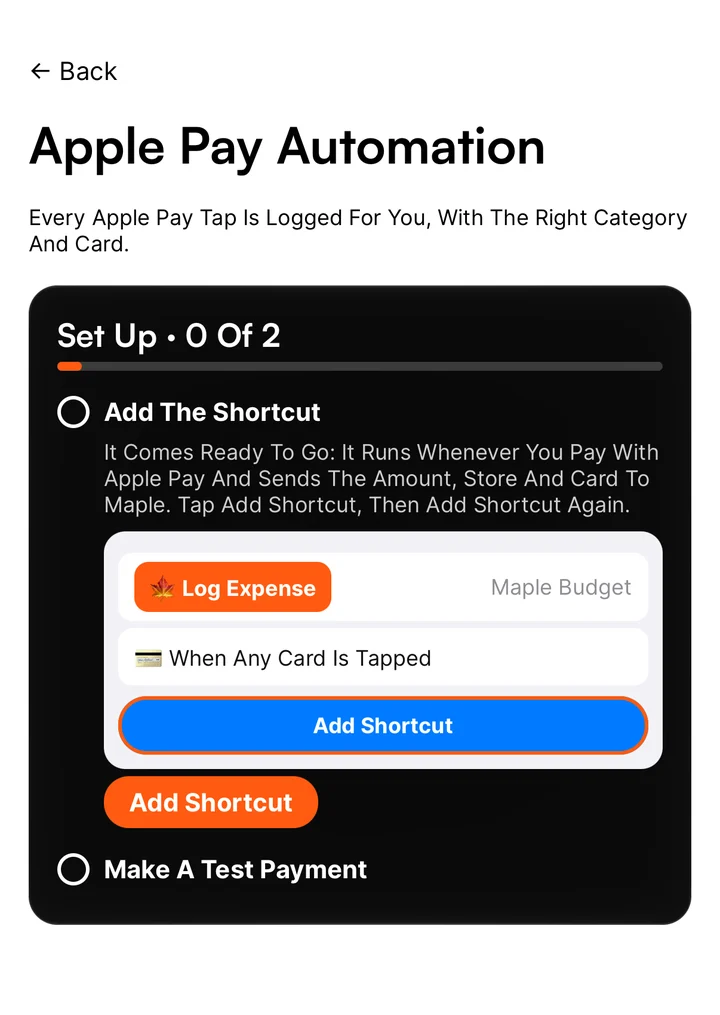
Tap Menu. Shortcuts is in the App group. Then tap Apple Pay Automation.
2. Add The Shortcut
Under Add The Shortcut, tap Add Shortcut. The Shortcuts app opens with Log Expense. Tap Add Shortcut again to keep it.
3. Create The Automation
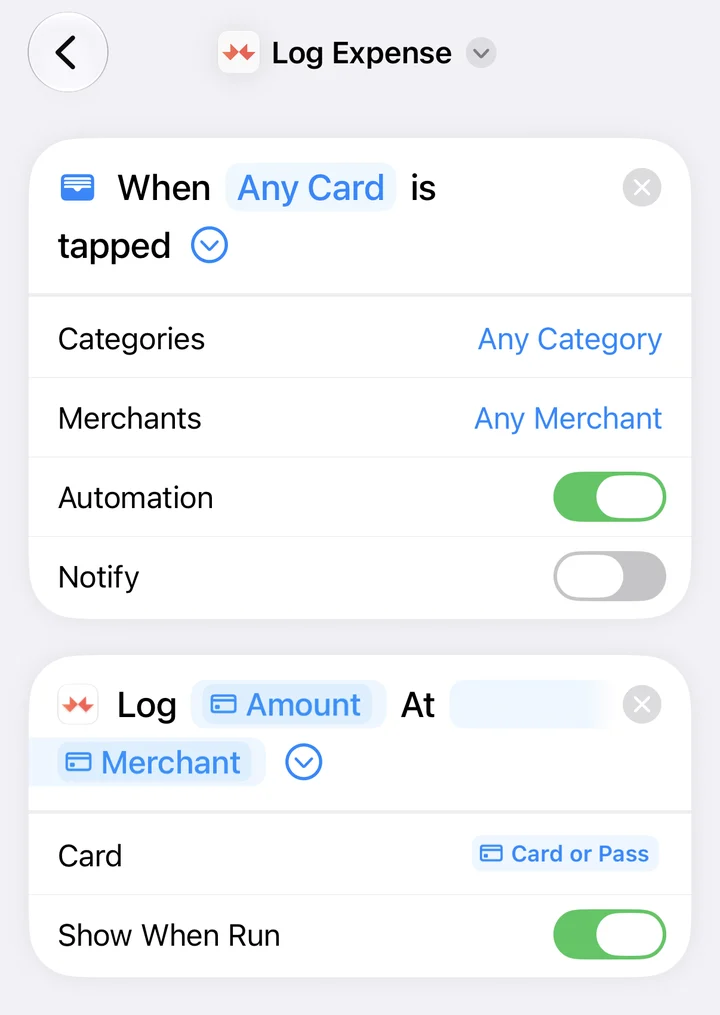
iOS doesn’t let apps add this part for you. Tap Open Shortcuts, go to Automation and tap +. Pick Wallet, then add Log Expense. Set the amount and merchant to come from the transaction, and make sure the automation is on. The iPhone Shortcuts page has a video of each tap.
4. Make A Test Payment
Pay for something with Apple Pay. The Make A Test Payment step ticks itself when the purchase arrives in Maple.
Nothing showing? Send A Test checks that Maple can receive purchases from Shortcuts. In Shortcuts, open your Wallet automation and check it’s on, and that the amount and merchant come from the transaction.
5. Log Cash With A Triple Tap
On the same Shortcuts page, Triple Tap sets up Back Tap. Tap the back of your iPhone three times, type the amount and you’re done. See Paid Cash? Tap The Back Of Your Phone.
On Android
The Apple Pay shortcut is iPhone only. On Android, add purchases with the purple +, or connect your bank with Maple Pro so they come in on their own.
On The Web
There’s nothing to set up on the web. Purchases the shortcut logs show up in the web app right away, because it’s the same account.
Tips
- Maple picks the category from your own choices first, then stores it knows, then AI. Fix one and it remembers.
- Siri, Spotlight and the Action Button can run Maple shortcuts too. The iPhone Shortcuts page shows how.
Common Questions
Does It Work On Android?
No. Shortcuts and Wallet automations are iPhone features. On Android, log purchases by hand or connect your bank with Maple Pro.
Does Maple See My Card Number?
No. The shortcut only sends the amount, the store name and the name of the card you tapped.
Is It Free?
Yes. The Apple Pay shortcut is free. You don't need Maple Pro or a bank connection.
What If The Category Is Wrong?
Open the transaction and pick the right category. Maple remembers what you picked for that store next time.
Try It In Maple Budget
Budgeting is free on iPhone, Android and the web. One account works everywhere.